System Stats
Live battery, CPU, RAM, temperature, and fans at the top of the menu — icon, value, label. Missing sensors hide automatically. Toggle in Settings.
ClamKeep lives in the menu bar. Wake Mode holds the system, the display, and auto-lock — then you can re-enable Display Sleep or Auto Lock as exceptions. A live system-stats dashboard sits at the top of the menu.
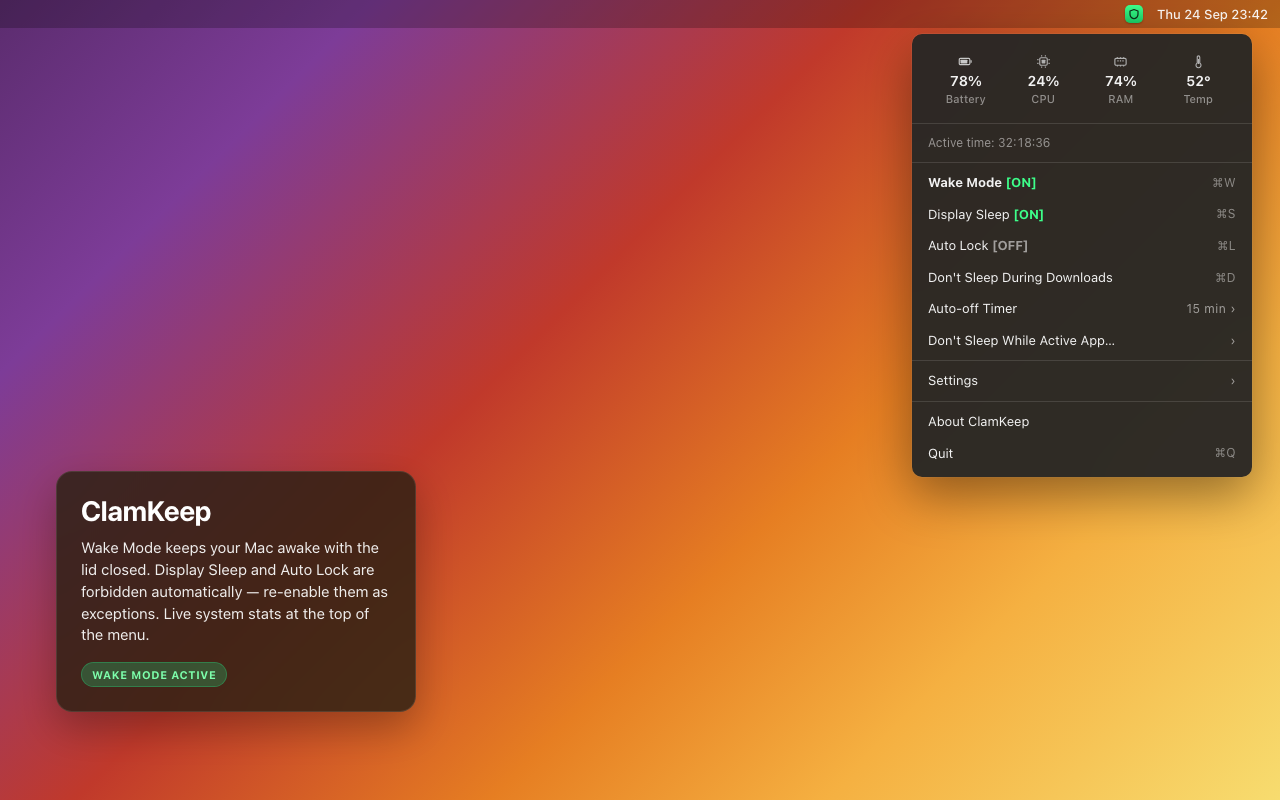
Everything at a glance — plain language, no power jargon.
Live battery, CPU, RAM, temperature, and fans at the top of the menu — icon, value, label. Missing sensors hide automatically. Toggle in Settings.
Everything at once: keeps your Mac awake with the lid closed, keeps the screen on, and delays auto-lock. On enable those holds are automatic; on disable the whole session ends. Shows ON / OFF.
Manual exception. ON — screen can turn off while Wake Mode is on. OFF — screen stays on (default on every new session).
Manual exception. ON — Mac can lock after idle. OFF — delayed (default on every new session). Manual lock (⌃⌘Q) is always immediate.
Standing policy: holds wake for download processes and recent activity in your Downloads folder.
Keeps wake on while a selected app runs. When it quits, only that reason is cleared.
5–60 minute presets or custom hours:minutes. The menu header shows a live countdown.
manual / downloads / watched app — one source ending does not cancel the others.
EN / RU / KK, launch at login, show/hide system stats, five icon styles, universal binary, passwordless helper.
How each state treats the display, auto lock, and a closed lid.
| State | Display | Auto lock | Lid closed |
|---|---|---|---|
| Wake Mode ON (default) | Screen stays on | Delayed | Screen off (hardware), system awake |
| Display Sleep ON | Display may sleep | Delayed | Screen off (hardware), system awake |
| Auto Lock ON | Screen stays on (unless Display Sleep also on) | Normal after idle; manual lock immediate | Screen off (hardware), system awake |
| Wake Mode OFF | Standard macOS | Standard macOS | Standard macOS |
| + Auto-off Timer | Header countdown; session ends at 00:00:00 | ||
Three steps. One-time admin password for the helper.
Open the DMG and drop ClamKeep into Applications.
Approve the one-time helper install (admin password).
Requires macOS 13+. Universal binary (Apple Silicon + Intel).
Recent highlights from the release notes.
/usr/local/bin was missing~/Downloads activity detection